



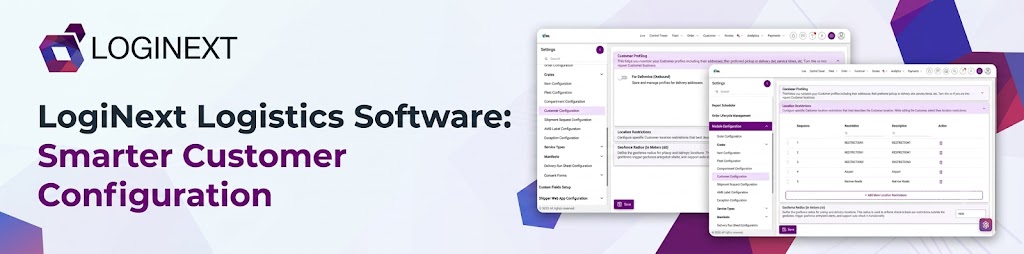
LogiNext Logistics Software: Smarter Customer Configuration
Logistics software should do more than process orders. It should help operations team manage the customer information, preferences and location-related rules that influence how deliveries are handled. LogiNext Customer Configuration brings these settings together in one place. Thereby, helping teams manage recurring customer profiles, configure automated location updates and define customer-location restrictions.
Instead of treating every customer interaction as a fresh setup, businesses can establish consistent rules for their operations. Here’s how Customer Configuration works, what teams can control and how to get more value from it.
Key Takeaways
- Customer Configuration centralizes customer-related settings in LogiNext logistics software.
- Customer Profiling supports the reuse of stored customer details during order creation.
- AI Auto Update Customer Location lets teams configure location updates after successful pickups and deliveries.
- Location Restrictions provides controls for managing customer-location restrictions.
- Reviewing customer records and configuration settings helps teams keep their workflows aligned with operational needs.
Why Does Customer Configuration Matter in Logistics?
Customer information is easy to overlook until something goes wrong. An outdated address, a missing contact detail or a mismatch between a checkout location and actual delivery location can create extra work for operations teams.
These problems sit within a larger delivery challenge. According to Ofcom, 68% of UK parcel recipients reported experienced atleast one delivery issue in 2025. The same research found that 23% experienced issues involving a lack of information or delivery options. These figures cover delivery experiences broadly, not just customer-data problems, but they show why reliable information and well-managed processes matter.
For businesses handling recurring orders, manually managing customer details can become repetitive. Teams need a practical way to maintain customer information manage location-related settings and establish consistent rules.
That’s where Customer Configuration in LogiNext comes in.
What Is Customer Configuration in LogiNext Logistics Software?
Customer Configuration is a module in the LogiNext Dispatcher Web App where teams manage customer-related settings that influence order creation and execution. It brings together three key areas:
- Customer Profiling: Store and manage recurring customer information, including addresses, preferred pickup or delivery slots, and service times.
- AI Auto Update Customer Location: Configure how customer locations are updated following successful pickup or delivery events.
- Location Restrictions: Add, manage, delete, and reorder customer-location restrictions.
These capabilities serve different purposes, but they share one objective: giving operations teams greater control over customer-related settings.
Rather than being a separate customer relationship management system, Customer Configuration focuses on settings relevant to logistics workflows.
What Can You Configure in Customer Configuration?
The module lets teams manage customer-related preferences and operational settings from a centralized location. Here’s how its main capabilities work.
1. Customer Profiling: Reuse Customer Information
Customer Profiling helps teams maintain recurring customer details rather than repeatedly entering the same information for every order.
When Customer Profiling is enabled and an active Customer ID exists, LogiNext can retrieve customer details from Customer Master. And automatically populate fields such as name, email address, contact number, and primary address during order creation.
Customers with multiple addresses can have a unique Address ID for each address, allowing the operator to select the appropriate one from a dropdown.
Teams can configure pickup and delivery profiling separately, according to their operational requirements.
2. AI Auto Update Customer Location: Keep Location Data Current
Customer locations recorded at checkout may not always match the location where a successful pickup or delivery takes place.
LogiNext lets teams configure AI Auto Update Customer Location to update customer-location information following successful pickup or delivery events.
Teams can choose between updates after every successful pickup or delivery and updates after multiple successful events.
An optional setting can also prompt the delivery associate to confirm the correct location when the distance between the geocoded customer location and the order checkout location crosses a configured threshold. The minimum permitted threshold is 200 meters.
If the associate confirms the correction, a Confirm Address alert can be triggered for the customer, provided that alert is enabled.
This gives teams control over how location updates are handled, rather than applying the same update frequency to every operation.
3. Location Restrictions: Manage Customer-Location Rules
Some customer locations may require specific restrictions. The Location Restrictions section provides a dedicated place to manage these settings.
Teams can add new restrictions, delete existing ones using the Action column, and reorder restrictions through drag-and-drop controls. Changes are applied by clicking Save.
The value is straightforward: customer-location restrictions can be managed in one place, making them easier for operations teams to review and maintain.
How Do You Set Up Customer Configuration?
Getting started takes only a few steps in the Dispatcher Web App.
1. Click the Settings icon.
2. Select Customer Configuration.
3. Expand the relevant section, such as Customer Profiling or Location Restrictions.
4. Adjust the settings according to your operational requirements.
5. Click Save.
The best setup depends on how your team handles customer records, recurring orders, and location changes. Before enabling a setting, decide which workflow it should support and who will review it when requirements change.
For example, a business with frequent repeat orders may prioritize Customer Profiling, while a business dealing with changing customer locations may pay closer attention to location-update settings.
How Can Teams Get More Value From Customer Configuration?
Configuration is most useful when it reflects the way an operation actually works. Here are three practices worth following.
- Keep customer records accurate. Review stored details regularly and deactivate profiles that should no longer populate new orders. Inactive customers can still be found during order creation, but their remaining details won’t automatically populate.
- Choose location-update rules deliberately. Decide whether updating after every successful event or after multiple events makes more sense for your workflow. If you enable the confirmation prompt, use a valid threshold of at least 200 meters.
- Review settings as processes change. When pickup procedures, delivery preferences, or customer-address workflows change, revisit the relevant configuration settings.
Why does this matter? Research from Bringg found that 81% of surveyed shoppers would not return to a retailer after receiving incorrect orders two or three times. This is a broader customer-experience finding, not proof that customer configuration alone prevents incorrect orders. It does, however, underline why businesses should take operational accuracy seriously.
One important distinction: customer profiles cannot be deleted once created. If a customer should no longer auto-fill information into new orders, teams can mark the customer inactive. Alternatively, disabling Customer Profiling stops new orders from using previously stored customer data through that feature for automatic population. Existing orders are not retroactively changed by this setting.
Also Read: LogiNext AI Insights: From Data to Decisions
Frequently Asked Questions
1. What is Customer Configuration in LogiNext?
Customer Configuration is a module in the LogiNext Dispatcher Web App for managing customer-related settings, including Customer Profiling, automated customer-location updates, and Location Restrictions.
2. How do I enable Customer Profiling?
Go to Settings → Customer Configuration, expand Customer Profiling, configure the pickup and delivery options you need, and click Save.
3. Can LogiNext automatically update customer locations?
Yes. AI Auto Update Customer Location can be configured to update locations after every successful pickup or delivery, or after multiple successful events.
4. Can customer profiles be deleted?
No. End Customer records cannot be deleted once created. You can mark a customer inactive to prevent their remaining details from automatically populating new orders.
5. What happens when Customer Profiling is disabled?
New orders stop using previously stored customer data through Customer Profiling for automatic population. Existing orders are not retroactively changed by this setting.
Conclusion: Configure Customer Data for Better Logistics Operations
Customer Configuration may not be the flashiest part of logistics, but it plays an important role in how teams manage customer information. From reusing customer profiles to configuring location updates and managing restrictions, the right settings help operations teams establish more consistent workflows.
With LogiNext logistics software, teams can manage these customer-related settings in one place and align them with their operational requirements. Customer Configuration gives them greater control over how customer information is handled during order creation and execution.
Ready to simplify customer configuration and strengthen your logistics workflows? Explore LogiNext’s logistics software to discover how its capabilities can support your delivery operations.
 |  |  |




@LogiNext