




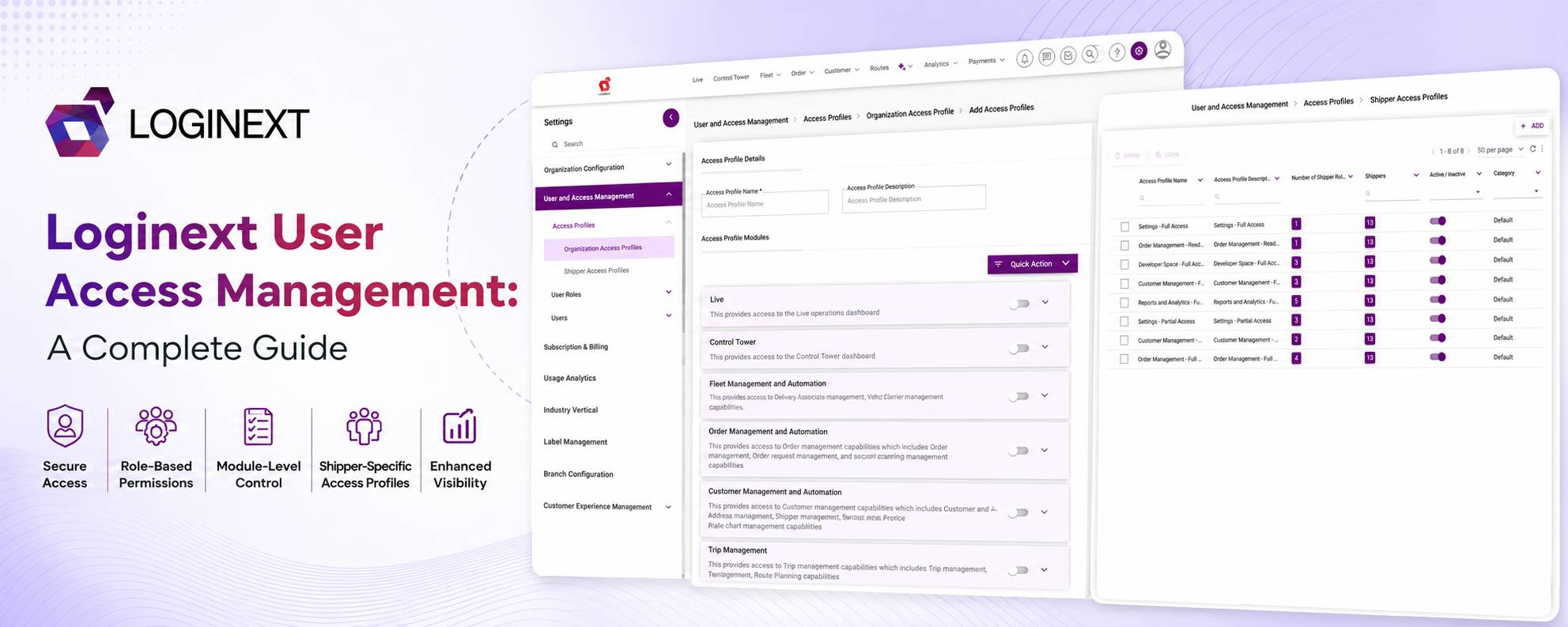
LogiNext User Access Management: A Complete Guide
Picture a logistics operation on a normal Monday morning. The dispatcher is assigning deliveries. The operations manager is checking performance. A shipper is creating orders. Someone from finance only needs to view a few reports. User access management helps ensure each of them gets access to the information and actions they actually need.
And the administrator? They need access to almost everything. Now imagine giving all of them the same login permissions. That is where things get messy.
As logistics operations grow, so does the number of people using the platform. Role-centric access management helps align permissions with what people actually do, so a dispatcher does not need the same access as a shipper.
EY found that 51% of respondents in its 2025 SOC Reporting Virtual Conference poll identified periodic user access reviews as their biggest identity and access management challenge.
So the question is not simply, “Who gets access?” It is “Who gets access to what?” The answer starts with clearly defined roles, permissions, and access profiles.
Key Takeaways
- User access management controls what users can access and what actions they can perform.
- Roles group users based on their responsibilities, while Access Profiles define their permissions.
- Role-centric access management helps align permissions with actual job responsibilities.
- Granular permissions can differentiate access for dispatchers, shippers, and other users.
- Regular access reviews help prevent outdated or excessive permissions.
What Is User Access Management?
At its simplest, user access management answers two questions: Who is this user? What should this user be allowed to do?
Instead of giving everyone the same level of access, organizations can assign permissions based on responsibilities, roles, and business requirements.
In a logistics platform, those permissions can get very specific. One user might only need to view orders. Another may need to create and edit them. Someone else might need to manage operational settings.
This is where role-centric access management becomes useful. Instead of asking, “What permissions should this individual user have?” organizations can start with the role.
What does a dispatcher or shipper need to do? What does an operations manager need to see?
Permissions can then be grouped around those responsibilities. This approach is closely related to role-based access control (RBAC), which can simplify permission management while reducing unnecessary privileges.
Why Does User Access Management Matter in Logistics?
A logistics platform rarely has just one type of user doing one type of job.
Dispatchers, shippers, operations managers, administrators, and other teams may all work within the same platform, but their responsibilities can be very different.
Giving everyone unrestricted access might seem convenient at first. Until someone changes something they were never supposed to touch. Effective user access management helps teams:
- Give users access based on their responsibilities.
- Limit access to modules they do not need.
- Separate administrative and operational responsibilities.
- Standardize permissions across similar roles.
- Make onboarding and role changes easier.
- Reduce unnecessary or excessive permissions.
And that last point matters.
EY’s analysis of more than 2,000 SOC reports found that logical access was associated with 52% of SOC 1 deviations and 40% of SOC 2 deviations in its analysis of 2024 and 2025 financial audits.
For logistics businesses, access management is therefore not just an IT concern. It can also affect how smoothly people work inside operational systems.
How Does User Access Management Work in LogiNext?
Now let’s bring our Monday morning operation into LogiNext. The dispatcher needs operational access. The shipper needs access to their workflows. The administrator needs broader control.
How do you manage all of that without configuring every user from scratch? LogiNext uses a structured relationship between users, roles, Access Profiles, modules, and permissions:
User → User Role → Access Profile → Module → Permission
A user is assigned to one User Role. That role can have multiple Access Profiles, while an Access Profile can be linked to multiple User Roles.
The permissions configured within those profiles determine what users in those roles can actually see and do.
For example, an Operations Manager may need to view, add, and edit orders but should not be able to delete them. Their Access Profile can reflect exactly that. Another user may only need visibility into operational data. They could have a read-only profile.
Same platform. Different responsibilities. Different access.
This is where role-centric access management starts doing the heavy lifting. Organizations can create profiles around common responsibilities instead of configuring every user individually.
A simple way to visualize the model is:
User → User Role → Access Profile → Module Permissions → Actions
The distinction is simple: the role tells you who the user is in the organization. The Access Profile tells you what that role can actually do.
How Do LogiNext Access Profiles Manage User Permissions?

Think of an Access Profile as a permission blueprint. It defines what a particular user role can access and which actions that role can perform within the logistics application.
In LogiNext, Access Profiles can be configured at the module level, with permissions such as View, Add, Edit, and Delete, where applicable.
Administrators can also use quick actions to assign all permissions or read-only permissions before reviewing and saving the configuration.
So access management goes beyond asking: “Can this person enter the platform?” The better question is: “What should this person be able to do once they are inside?”
One user may need to view orders but not delete them. Another may need to create and update orders but have no reason to touch administrative settings. Granular Access Profiles allow those differences to exist without creating a completely separate setup for every person.
Organization vs. Shipper Access Profiles in LogiNext
Not everyone in a logistics operation works on the same side of the business. A dispatcher may manage operational workflows, while a Shipper may need access to functions related to their own orders and activities.
That is why LogiNext uses two types of Access Profiles: Organization Access Profiles and Shipper Access Profiles. The table below shows how the two differ in terms of users, applications, and workflows.
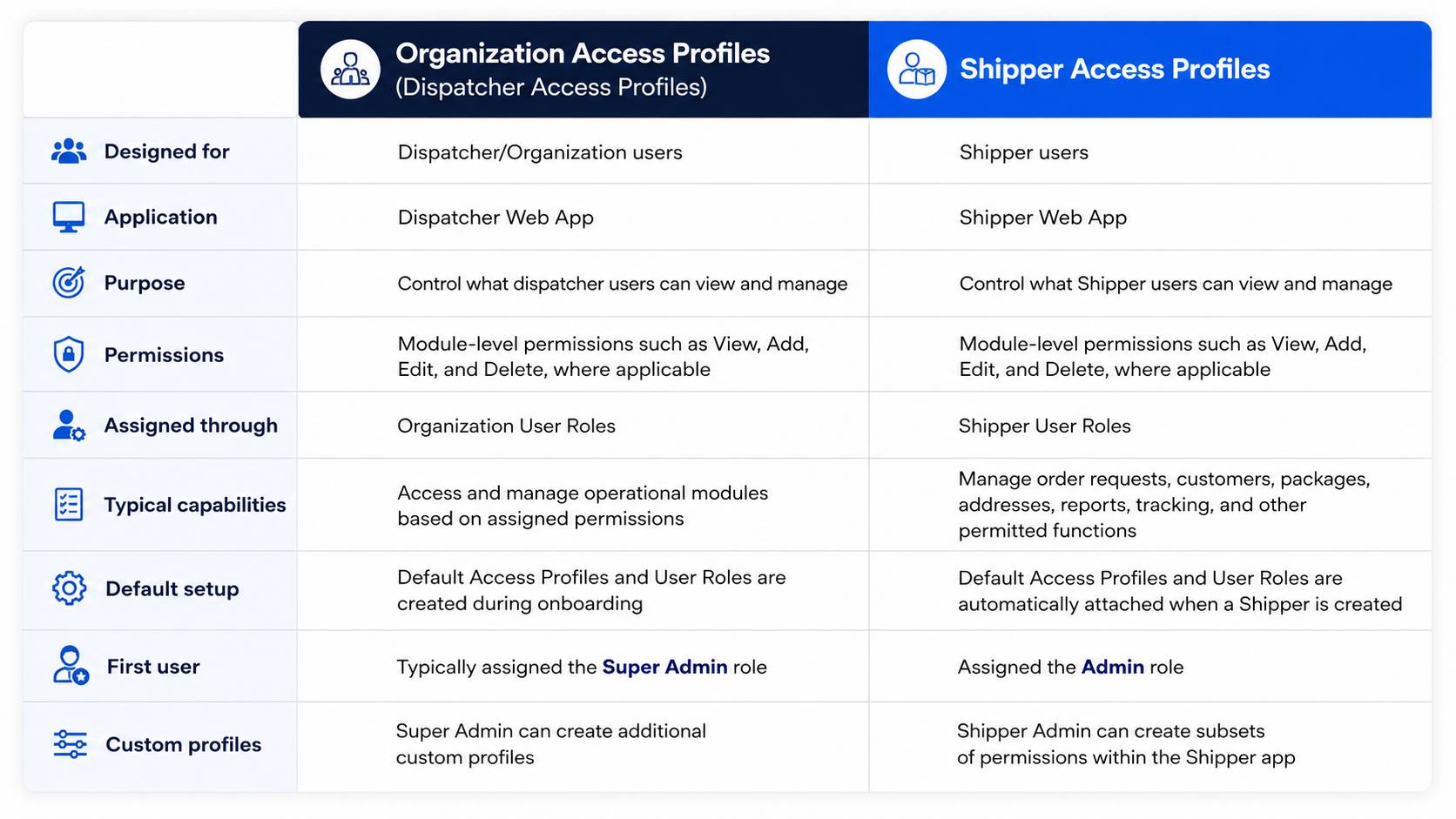
The distinction is straightforward. Organization Access Profiles are built around dispatcher workflows, while Shipper Access Profiles control the functions available to Shipper users.
This separation ensures that each user group gets access to the tools and information relevant to its responsibilities, without making the permission structure unnecessarily complicated.
Who Can Create and Manage Access Profiles in LogiNext?
There is another piece of the puzzle: Who gets to manage access itself?
Access management works best when ownership is clearly defined. In LogiNext, dispatchers can create Shipper users and Shipper Access Profiles. Shippers can also create their own Shipper users and Shipper Access Profiles.
There is an important distinction, however.
Shippers can create Shipper User Roles, while dispatchers cannot create Shipper roles. Dispatchers can edit default Shipper entities, but they cannot edit entities created by the Shipper.
These rules create clearer ownership between the Organization and its Shipper users. Each persona can manage the access relevant to its responsibilities, while keeping control boundaries clear.
Best Practices for Managing User Permissions

Good access management is not about creating the most complicated permission structure possible. If your access model needs a treasure map to understand it, something has probably gone wrong.
The goal is simple: give people enough access to do their jobs without giving them access simply because it is convenient.
1. Assign Access Based on Responsibilities:
Start with the job, not the person. Permissions should reflect what a user actually needs to do, not simply their seniority. A senior employee does not automatically need administrative access to every module.
2. Use Roles to Standardize Permissions:
If ten people perform similar tasks, there is little value in creating ten different permission setups. Create a role with the appropriate Access Profiles instead. This makes onboarding, role changes, and permission updates easier to manage.
3. Keep Permissions Granular:
Seeing something and changing something are two very different powers. Separate viewing from actions such as adding, editing, or deleting wherever the platform allows it. Read-only access can be perfectly adequate for users who need information but do not need to modify it.
4. Review Access Regularly:
People change roles. Responsibilities change. Teams change. Access should change with them.
EY identifies periodic access reviews as the biggest IAM challenge among respondents in its 2025 poll, highlighting why access management cannot be treated as a one-time setup.
5. Avoid Giving Everyone Admin Access:
This is the classic shortcut: someone needs access quickly, so they get admin permissions “for now.” Then “for now” somehow becomes permanent.
Give users the permissions they actually need instead of broader privileges by default. This keeps responsibilities clearer and supports a more disciplined role-centric access management approach.
Frequently Asked Questions
1. What is user access management?
User access management is the process of controlling which users can access specific systems, modules, information, and actions based on their roles and responsibilities.
2. What is the difference between a user role and an Access Profile?
A user role represents a user’s functional responsibilities, while an Access Profile defines the permissions associated with that role. A role can be connected to one or more Access Profiles.
3. What is role-based access control?
Role-based access control, or RBAC, assigns permissions to predefined roles and then assigns users to those roles. It provides the foundation for role-centric access management, where permissions are organized around what users need to do based on their responsibilities.
4. Why is user access management important in logistics?
Logistics platforms often serve multiple user types with different responsibilities. User access management helps organizations give each user the functionality they need without providing unnecessary permissions.
5. What can logistics Access Profiles control?
Depending on the platform and configuration, Access Profiles can control permissions across modules and actions such as viewing, adding, editing, and deleting information.
Conclusion
Back to our Monday morning logistics operation.
The dispatcher needs to dispatch. The shipper needs to manage orders. The operations manager needs visibility. They may use the same platform, but they don’t need the same access.
That is the value of user access management. With LogiNext Access Profiles, organizations can align user roles with granular permissions across modules and actions.
The goal is simple: the right user, the right access, and the right level of control. If you’re looking to simplify access across your logistics operations, talk to LogiNext and explore how Access Profiles can fit your workflow.
“”
 |  |  |




@LogiNext