

AI-native control layer
System Preferences: Aligning Global Logistics with Your Local Business Logic
For global enterprises, a "one size fits all" approach to software leads to operational friction. Managing a diverse supply chain requires a platform that speaks your language, literally and figuratively. LogiNext's System Preferences serve as the foundational control layer, allowing you to configure and reset various parameters provided during onboarding to ensure your account perfectly aligns with your specific business requirements.
A multinational consumer goods distributor operating across North America and Europe struggled with inconsistent reporting because their legacy system could not unify different unit systems and date formats. By leveraging LogiNext's AI-native System Preferences, they standardized their base country, currency, and unit systems across all regions. Within one quarter, they eliminated manual data conversion errors and improved their Third-Party Logistics (3PL) Integration transparency, as all partners began receiving data in a unified, enterprise-approved format.
What Operational Risks Escalate Without Flexible System Preferences?
Fragmented Global Standards
Impact
Confusion when different regional hubs use conflicting date formats or unit systems.
Onboarding Bottlenecks
Impact
Slower deployment for new users due to incorrect default language settings.
Inaccurate Financial Reporting
Impact
Discrepancies in shipping costs when the base currency does not match actual operations.
Operational Misalignment
Impact
Errors in order volume and weight calculations during Third-Party Logistics (3PL) Integration due to unit system mismatches.
The AI-Native Flow for Third-Party Logistics (3PL) Integration
What Measurable Impact do System Preferences Deliver?
Instant Multi-Region Standardization
For parameters like Temperature (°C/°F) and Distance (KM/Miles).
100% Platform Consistency
By enforcing a single Base Currency across all transactions and reports.
Seamless Language Localization
By setting default languages for all new user creations.
Rapid Global Deployment
Through a centralized hierarchy for base country and timezone preferences.
Frequently Asked Questions
What is AI Logistics System Preferences Optimization?
AI Logistics System Preferences Optimization enables organizations to configure platform-wide operational settings that align with their logistics workflows and business requirements. By centralizing system preferences, enterprises can standardize how users interact with the platform, helping ensure consistent processes across branches, regions, and logistics operations.
How do system preferences improve logistics operations?
System preferences help enterprises adapt the logistics platform to their operational requirements without changing core business processes. Standardized configurations improve consistency across teams, reduce manual configuration errors, simplify onboarding, and ensure that logistics workflows operate uniformly across multiple locations and users.
Can AI Logistics System Preferences Optimization support multi-branch and enterprise deployments?
Yes. AI Logistics System Preferences Optimization is designed for organizations operating across multiple warehouses, branches, and regions. Centralized preference management helps maintain consistent operational settings throughout the enterprise while allowing businesses to scale logistics operations with standardized workflows and governance.
What can I configure within System Preferences?
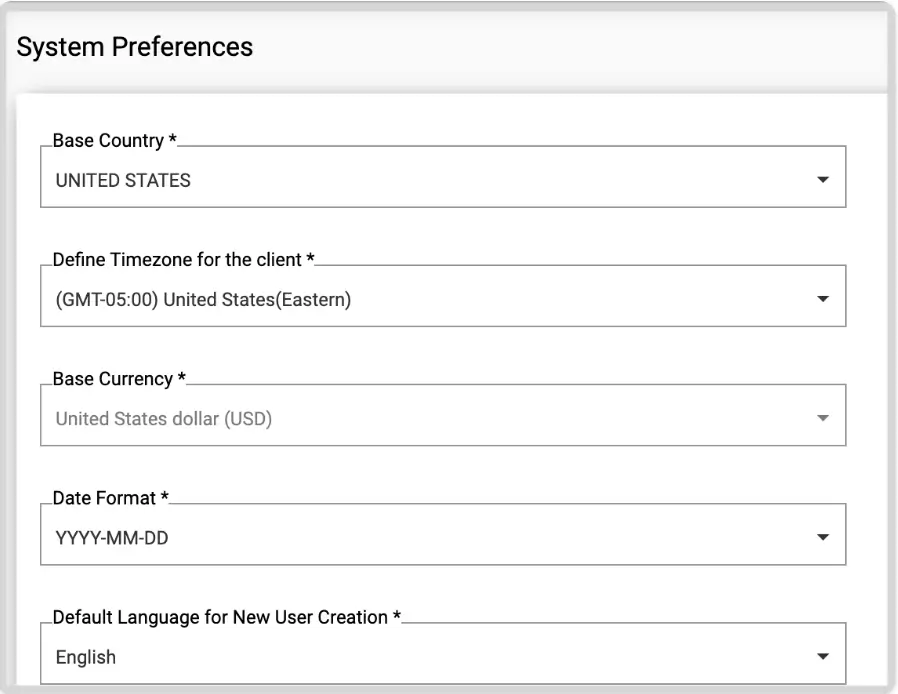
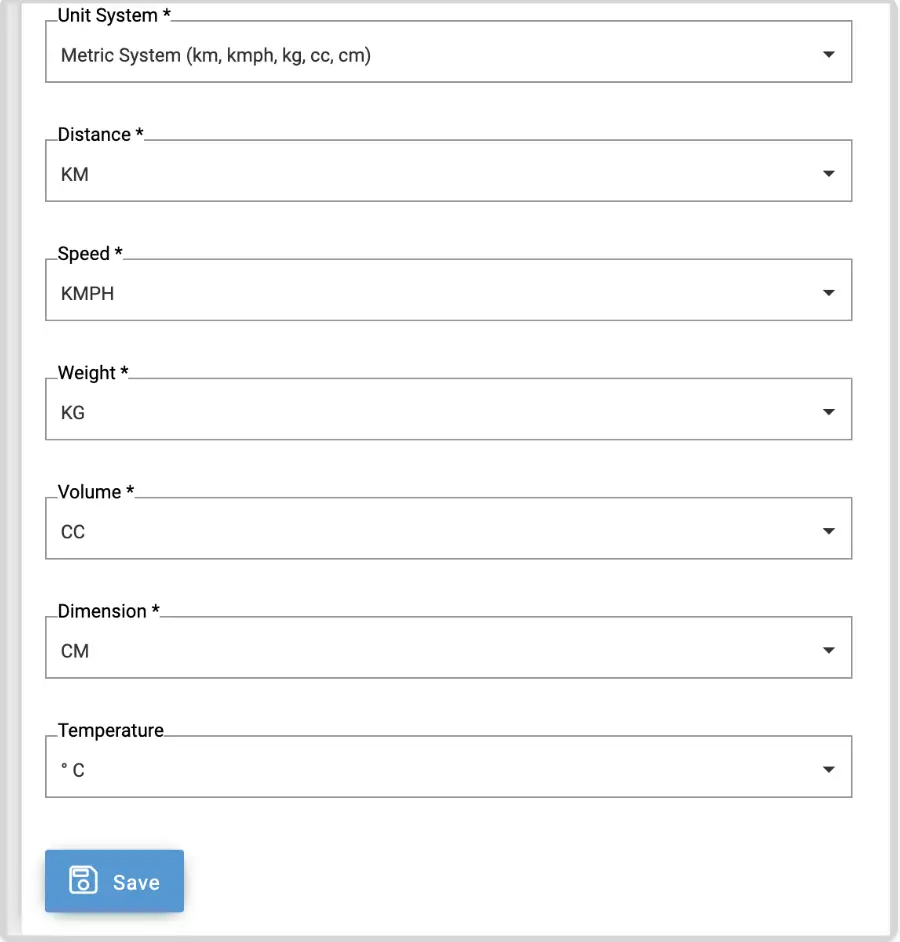
You can set your base country, timezone, currency, date format, unit systems (distance, speed, weight, volume), and default language for new users.
How does this affect Third-Party Logistics (3PL) Integration?
It standardizes the data formats and units used when communicating with carriers and shippers, ensuring accurate reporting and operational alignment across your network.
Can I change my base currency later?
The base currency cannot be changed directly in the module to protect transaction integrity; however, you can request a change by raising a support ticket if it was misconfigured.
How quickly do these preference changes reach my drivers?
Drivers see a banner immediately to refresh their app; otherwise, the Driver App will auto-update with the new settings within 20 minutes.