
LogiNext Hotspots: Putting Idle Drivers Where Orders Are
Delivery management gets complicated when ten orders are waiting at one quick-service restaurant (QSR). Three delivery associates are parked outside another, and nobody knows how to connect the dots. During lunch and dinner rushes, this mismatch between order demand and available drivers can mean cold fries, delayed deliveries, and frustrated customers.
LogiNext Hotspots helps address this challenge by giving eligible delivery associates a visual view of nearby demand and supply. The feature uses hexagonal map zones to highlight areas with unmet demand. Associates can use these insights to decide where to position themselves. For QSR operators, this improves demand awareness beyond static delivery zones and manual coordination.
Key Takeaways
- Delivery management becomes harder when order demand and driver availability are unevenly distributed.
- LogiNext Hotspots uses hexagonal map zones to visualize supply and unmet demand.
- The Supply and Demand tabs serve different purposes and use specific eligibility and order-status rules.
- Hotspots help associates make informed positioning decisions but do not guarantee order assignments or faster deliveries.
- QSR operators should combine hotspot visibility with appropriate dispatch rules and operational performance measurement.
Why Does Delivery Management Get Messy During QSR Rush Hours?
Restaurant delivery demand doesn’t follow neat, predictable boundaries. A sudden lunch rush near an office district, a rainy evening, or a major sporting event can overwhelm one location while another nearby has more drivers than orders.
The opportunity is significant. The National Restaurant Association’s 2025 research found that 37% of U.S. adults order restaurant delivery at least once a week. Its 2025 report also found that nearly 75% of restaurant traffic happens off-premises, including takeout, delivery, and drive-thru orders.
As off-premises dining becomes a bigger part of restaurant operations, delivery management must account for more than the number of orders coming in. Operators also need to understand where demand is building and whether enough delivery capacity is available nearby.
Without that visibility, the consequences can include:
- Orders waiting longer: Prepared food sits while the store searches for delivery associates.
- Drivers losing productive time: Associates remain idle in quieter areas while nearby locations struggle to fulfil orders.
- Managers juggling too much: Store teams switch between kitchen coordination, order tablets, and driver communication.
- Customer experience taking a hit: Delayed deliveries put food temperature and promised delivery windows at risk.
The problem isn’t always a shortage of drivers. Sometimes, it’s a shortage of information about where those drivers are needed.
What are Delivery Hotspots in LogiNext?
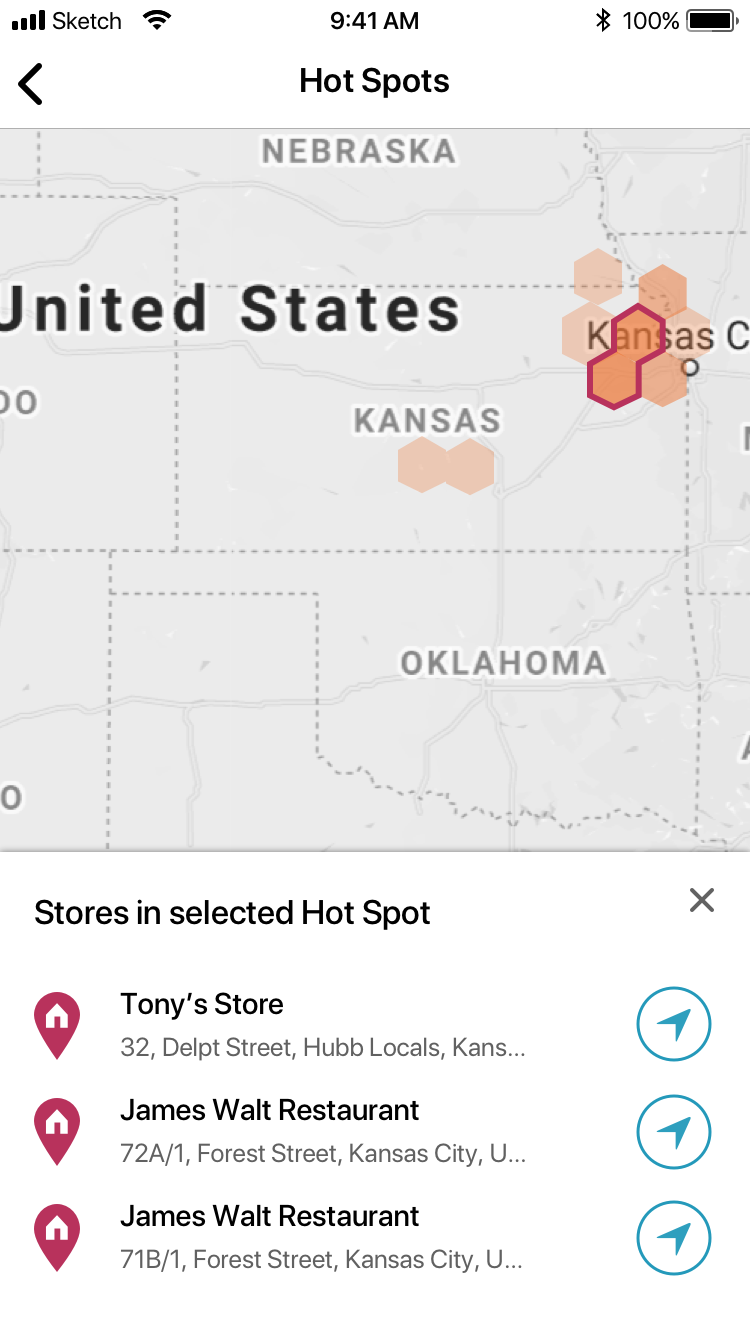
Delivery hotspots are hexagonal areas on a map that use color intensity to represent order concentration or a demand-supply imbalance. They give eligible delivery associates a visual indication of where additional delivery opportunities may exist.
Rather than scanning a crowded map full of individual order markers, associates can use these zones to identify areas that deserve attention.
LogiNext Hotspots provides two views:
Supply:
Shows delivery associates who meet the system’s eligibility requirements. Including being logged into the Driver App, marked present, having a recent tracking point, and having capacity to fulfill an order.
Demand:
Highlights areas with unmet demand. An order counts toward demand when auto-assignment is running, scheduled to run within the next five minutes, or has already run but the order remains unassigned within its active fulfillment window.
In the Demand view, darker red indicates higher unmet demand. A hotspot represents an area of demand, not a guaranteed pickup location or an automatic order assignment.
This distinction matters: the feature helps associates make better-informed positioning decisions, while order allocation and fulfillment remain governed by the configured operational rules.
How Does LogiNext Hotspots Work?
The feature turns demand and supply information into a simple map-based workflow.
1. Identify the Areas That Need Delivery Capacity:
Eligible associates open Hotspots from the hamburger menu in the Driver App. They can switch between Supply and Demand to understand the distribution of available capacity and unmet orders.
2. Spot Demand Through Hexagonal Zones:
The map uses color intensity to show demand conditions. In the Demand view, darker red highlights areas with higher unmet demand, helping associates recognize where additional capacity may be useful.
The map’s zoom level affects which hotspots appear. The default view covers roughly 2–3 km around the associate’s current location, while maximum zoom-out coverage is approximately 10 km.
3. Find Nearby Fulfilment Locations:
Associates can select a demand hotspot to view the warehouses associated with that area and use the navigation icon to navigate to a listed location.
An eligible associate already inside a hotspot receives an indication that they are in a hotspot and may receive orders soon. However, this is not a promise of an immediate assignment.
Eligibility also matters. Associates already at their maximum order capacity, or those in transit when multiple-order assignment is disabled, may not be eligible to view hotspots.
Operational example: Imagine a QSR chain has two branches two miles apart. Branch A has a growing queue of unassigned orders, while Branch B has available delivery associates waiting for work. A demand hotspot can help an eligible associate at Branch B identify the area where unmet demand is higher and navigate toward an associated fulfillment location. The aim is to make driver positioning more informed, not to guarantee that every waiting order is instantly assigned.
What Can Hotspots Mean for QSR Delivery Performance?
Hotspots can support better delivery management by helping operators and delivery associates respond to localized demand imbalances.
Less Unproductive Waiting:
When associates can identify areas with unmet demand, they have more information to guide their positioning decisions. Better-informed positioning can help reduce unnecessary idle time. Although the actual impact depends on demand patterns, travel time, and order allocation rules.
Better Support for Food Quality:
Delivery timing matters to customer experience. In the American Customer Satisfaction Index’s 2026 food delivery benchmarks, food temperature scored 76 out of 100, while accuracy of quoted delivery times scored 78.
These scores show that food temperature and delivery-time accuracy remain relevant parts of the customer experience. Hotspots do not control kitchen preparation or guarantee faster dispatch, but better demand awareness can help delivery teams respond more effectively when capacity is unevenly distributed. When integrated into broader delivery management software, hotspot visibility can support more informed decisions about driver positioning and fleet utilization.
More Informed Fleet Utilization:
The DoorDash 2025 Dash Report, based on U.S. delivery data from 2024, identifies 5 p.m. to 9 p.m. as the busiest period for Dashers. It also reports more than three million deliveries completed nationwide per day on average.
For QSR operators, peak periods make the location of available delivery capacity particularly important. Delivery fleet management becomes more responsive when associates have useful information about where demand is concentrated, rather than relying only on fixed zones or informal communication.
Less Manual Coordination:
Hotspots give associates a shared visual reference for demand conditions. This can support more informed decisions without requiring managers to coordinate every movement manually. The feature complements dispatch and allocation processes; it does not replace the need for appropriate staffing, sound fulfillment rules, or kitchen coordination.
How Can QSR Operators Get More Value from Hotspots?
Hotspots work best when the feature is configured correctly and used as part of a broader delivery management process.
- Enable the right access: Associates need the Consider in Hotspots permission. Supply and Demand tab access can also be controlled separately.
- Keep location data current: Associates must have a recent tracking point for the system to count them as supply
- Review order capacity: An associate who is already at maximum capacity may not be eligible to view hotspots.
- Configure multi-order assignment deliberately: Associates in transit can count as supply only when multiple-order assignment is enabled and they have available capacity.
- Evaluate performance using operational data: Track order waiting time, unassigned orders, driver idle time, deliveries per driver hour, and on-time fulfillment before and after introducing the feature. Compare similar peak periods and locations to understand its actual contribution.
This final step is important. A map can show where the imbalance exists, but operators still need performance data to determine whether their response is improving results.
Frequently Asked Questions
1. What are delivery hotspots?
Delivery hotspots are map-based zones that use color intensity to show order concentration or unmet demand. In LogiNext, hexagonal zones help eligible delivery associates identify areas where additional delivery capacity may be needed.
2. What is the difference between Supply and Demand tabs?
The Supply tab represents eligible delivery associates with current location information and available order capacity. The Demand tab highlights areas with unmet demand based on configured auto-assignment and fulfillment conditions.
3. Do LogiNext Hotspots automatically assign orders?
No. Hotspots help delivery associates identify areas where demand is higher. Order assignments continue to depend on the configured allocation process and operational rules.
4. Can a delivery associate view hotspots while completing an order?
Eligibility depends on order capacity and configuration. An associate in transit may be eligible if multiple-order assignment is enabled and they have available capacity. Associates at maximum order capacity may not be eligible.
5. How can QSR operators measure the impact of hotspots?
Operators can compare order waiting time, unassigned orders, driver idle time, deliveries per driver hour, and on-time fulfillment across comparable locations and peak periods. This helps establish whether hotspot-guided positioning is contributing to operational improvements.
Conclusion: Smarter Delivery Management Starts with Better Decisions
A busy restaurant doesn’t necessarily need more drivers everywhere. It needs enough delivery capacity in the right places, with the information to respond when demand shifts.
LogiNext Hotspots helps bridge the gap between order demand and driver availability through clear, map-based intelligence. By making unmet demand easier to identify, it gives eligible delivery associates another way to make informed positioning decisions during busy periods.
Want to explore how LogiNext can help your QSR delivery operations respond to changing demand? Talk to the LogiNext team to see how its delivery management capabilities can support your operational goals.